
01Custom ERP Development
Custom ERP Software Development in New York
Custom ERP software development connects the operational records that a New York business needs to trust: stock, orders, purchasing, production and reporting. SDO serves Brooklyn, Queens and Manhattan with systems shaped around real workflows rather than a collection of disconnected spreadsheets. We start with a complete operational problem and a phased release plan, with 100% ownership of the custom code.
02Signs You've Outgrown Spreadsheets
Signs You've Outgrown Spreadsheets
A spreadsheet is useful when a small team can understand and control the process. The problem appears when multiple people edit conflicting versions, formulas hide business rules or essential updates depend on one person. Those failures can make an order look complete while stock, purchasing and finance tell different stories.
Trace an actual order through receipt, fulfillment and reconciliation. Record the handoffs, duplicate entries and exceptions, including returned goods or changes after approval. If staff repeatedly reconcile the same information, the first need may be a shared record and a defined workflow rather than an elaborate dashboard.
Do not assume every spreadsheet should be replaced. Keep useful analytical tools where they fit, but agree where authoritative operational data lives. A custom ERP software development company should help distinguish a process that needs software from a process that first needs simpler rules.
03Custom ERP Software Development Services: Modules We Build
Custom ERP Software Development Services: Modules We Build
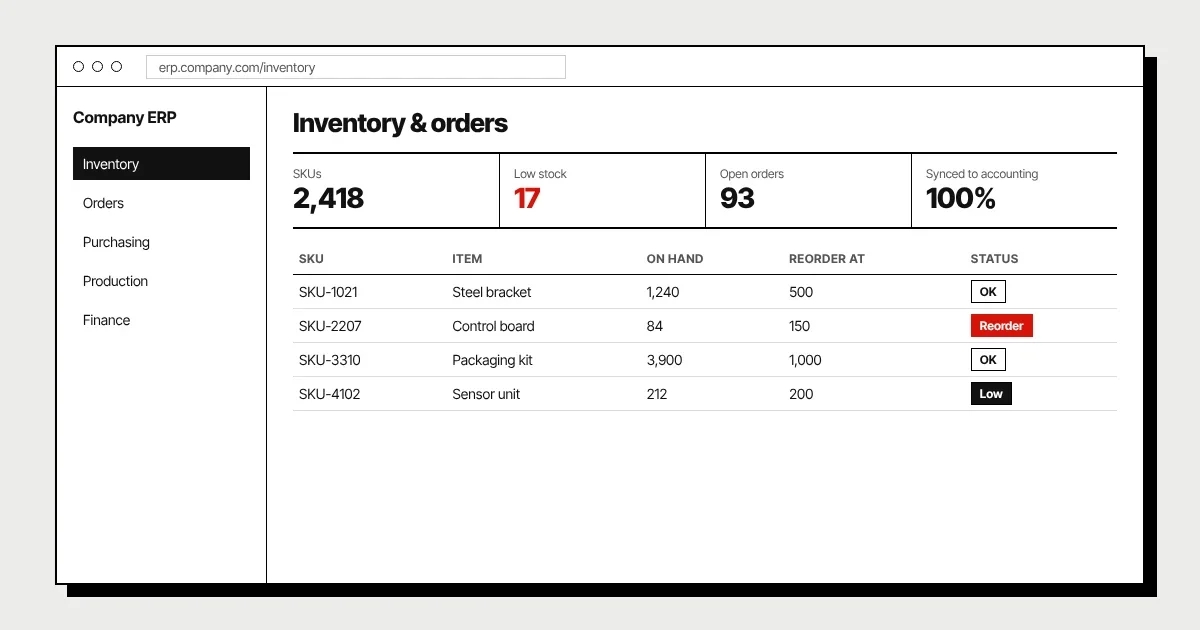
Modules should share agreed identifiers and definitions while remaining clear about their responsibilities. Choose the operational sequence that must work at launch before adding every department. Test a transaction through the whole sequence rather than approving each module in isolation.
- 01InventoryTrack agreed stock movements, locations and adjustments with a traceable history. Define units, reservations and the conditions under which availability changes. A current stock figure should be explainable from movements, not an editable number disconnected from operations.
- 02Orders and purchasingConnect requests, approvals, receipts and fulfillment to the records they change. Include partial deliveries, substitutions and cancellations in the workflow. Distinguish a requested order from an approved commitment so reporting does not mix different stages.
- 03ProductionPlan the work, inputs and status information your operation actually needs. Requirements may include material consumption, capacity or quality checks, but not every manufacturer needs the same model. Agree how exceptions are recorded before automating the normal sequence.
- 04Finance and reportingConnect operational events to the accounting source of truth with defined reconciliation rules. Management reporting should use consistent periods, statuses and valuation assumptions. Avoid duplicating a full accounting package when an integration can meet the requirement more safely.
04Choosing a Custom ERP Software Development Company or Platform
Choosing a Custom ERP Software Development Company or Platform
NetSuite and Odoo may provide an appropriate starting point when their modules and configuration match the business. Assess actual requirements, available implementation support and the cost of maintaining customizations. A commercial platform is not automatically restrictive, and a custom build is not automatically simpler.
A custom ERP can make sense when essential workflows or specialist integrations cannot be represented clearly in the available options. It provides control over the custom application and release priorities, but requires funding for development and operation. Compare options against the same process and data requirements rather than a generic feature count.
Include migration, staff training, integrations and support in the comparison. Review what happens when vendors change APIs or platform versions, and whether the business can export its important records. A focused technical review can help avoid buying or building a larger system than the operation can adopt.
05Integrations
Integrations
Integrations should support a complete transaction, not just copy fields between applications. Define which system owns customers, products, financial records and status changes. When more than one system can update a record, agree conflict handling and a way to investigate discrepancies.
QuickBooks connections can synchronize agreed accounting information through supported APIs and permissions. Shopify or other e-commerce integrations may bring orders, products or fulfillment updates into operations. Confirm vendor access, rate limits and licensing before estimating the work, and include refunds, cancellations and failed synchronization in the scope.
Other systems may include a CRM, warehouse software or specialist production equipment. Document mappings and retry behavior so temporary outages do not lose work or create duplicate records. Operators need visibility into synchronization status and a safe process for resolving exceptions.
06Rollout Without Disrupting Operations
Rollout Without Disrupting Operations
A new ERP can change daily work across several teams, so release planning must include the people operating it. Identify which workflows can move together, what will temporarily stay in the old system and who owns each record during transition. Uncontrolled parallel editing makes reconciliation harder rather than safer.
Rehearse migration using representative records and validate relationships, stock movements and meaningful totals. Agree how invalid or duplicate records are corrected and which historical information will be retained. Operational owners should sign off the result before the cutover window is scheduled.
Introduce the system through an agreed location, module or workflow where a staged rollout is practical. Train users on complete tasks and normal exceptions, not only navigation. Keep rollback criteria, support responsibilities and post-release checks visible so people know what to do if operations cannot proceed safely.
07How We Build Your ERP
How We Build Your ERP
Discovery maps the operation, source systems and acceptance criteria with staff and technical owners. Prioritize a complete first release, then prototype the important tasks and permission boundaries. The proposal states assumptions about access, migration and decisions before implementation begins.
- 01Design around the recordsDefine identifiers, relationships and ownership before the screens are finalized. Walk through an order, adjustment or approval with realistic data. Check that staff can explain the resulting state and history at each stage.
- 02Deliver in reviewed incrementsDevelopment proceeds in two-week sprints with demos of operational journeys. Include integration and exception handling in those reviews. Keep proposed additions visible so they do not silently delay the work required for launch.
- 03Test, migrate and hand overRehearse cutover, test business rules and confirm user acceptance with the operational team. Deliver code, repositories and credentials with practical documentation. Agree the owners of hosting, monitoring, updates and future modules before the system becomes part of daily work.
08FAQ
Frequently Asked Questions
Choose based on the business process, integration requirements and total operating cost. NetSuite, Odoo or another platform may fit well with configuration, while a custom ERP can suit workflows that require extensive workarounds. Assess migration, support and future changes for both options rather than assume custom development is always more flexible or cheaper.
09Related
Related Services
10Contact
Let's build your software in New York
Book a free 30-minute call. We'll review your idea and give you an honest plan and estimate.
+1 718-883-7253Service area: Brooklyn, Queens & Manhattan, NYC
Hours: Open 24/7